Table of Contents
- How Nothing Warp Works: A Cloud-Powered Bridge
- Cross-Platform Compatibility: A Rare Win for Android Users
- Privacy and Permissions: A Necessary Trade-Off?
- Real-World Use Cases: Where Nothing Warp Shines
- The Bigger Picture: Nothing’s Strategy Beyond Hardware
- Limitations and Room for Improvement
- The Future of Cross-Device Connectivity
- Final Thoughts: A Surprise Worth Celebrating
Nothing Warp: The Surprise File-Sharing Tool That’s Bridging Android and Desktop Gaps
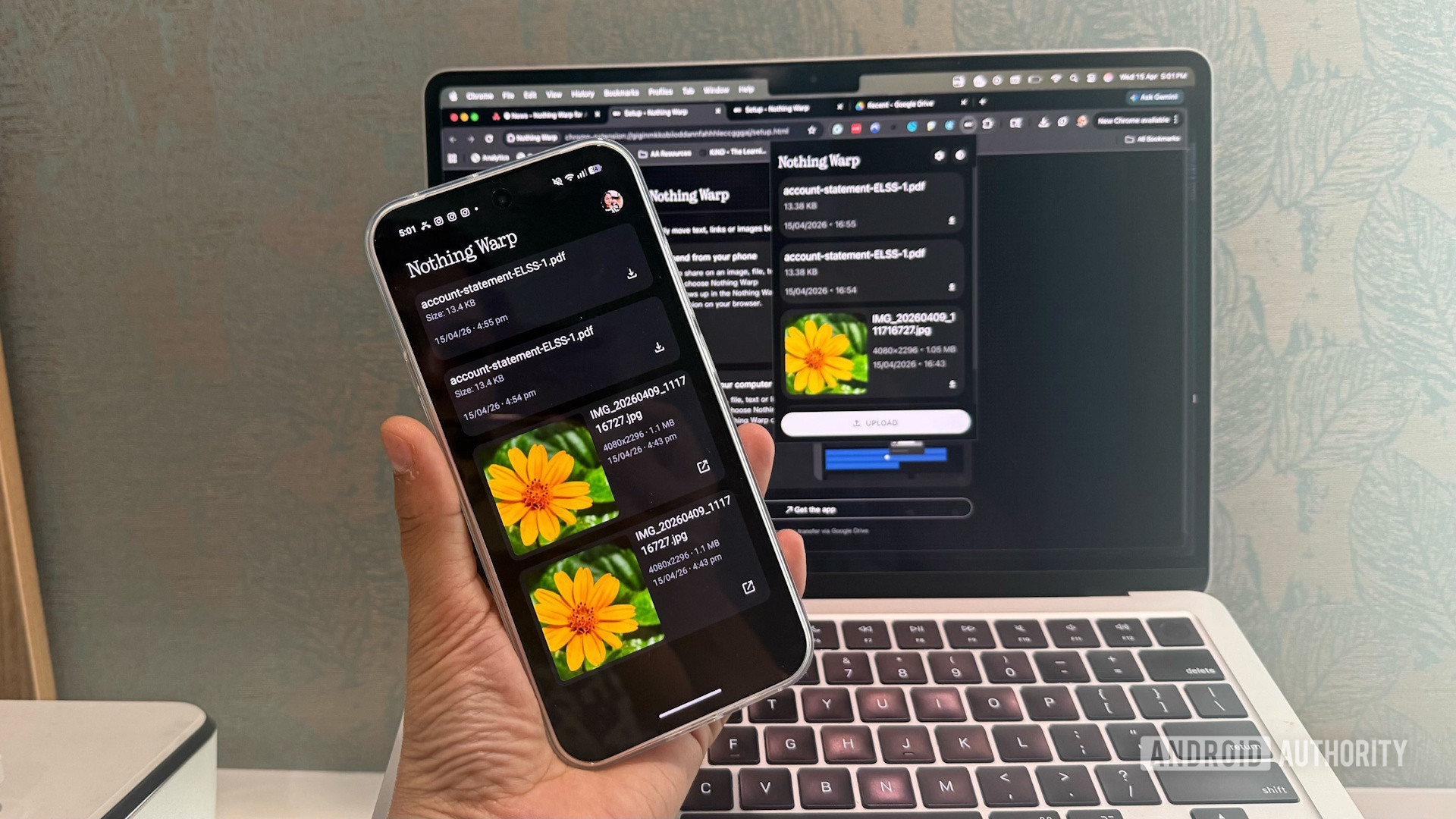
In a world where seamless device integration often feels like a luxury reserved for Apple’s walled garden, a surprising new contender has emerged from an unexpected source. Nothing, the London-based tech startup known for its minimalist design and bold marketing, has quietly launched Nothing Warp—a cross-platform file transfer tool that lets Android users send files, links, and clipboard content between their phones and desktops. While the company never promised AirDrop-like functionality, it delivered something even more intriguing: a clever, cloud-powered bridge that works across Android, Windows, Mac, and Linux.
At first glance, Nothing Warp might seem like just another file-sharing app. But beneath its simple interface lies a clever engineering solution that leverages Google Drive as a temporary staging ground, enabling real-time transfers without requiring both devices to be on the same network. It’s a clever workaround for a problem that has long plagued Android users: the lack of a truly seamless way to move data between mobile and desktop environments.
How Nothing Warp Works: A Cloud-Powered Bridge
Nothing Warp operates on a surprisingly elegant principle: use Google Drive as a temporary relay. When you send a file from your Android phone to your desktop, the app uploads it to a designated folder in your Google Drive. The Nothing Warp Chrome extension on your desktop detects the new file, downloads it, and then—crucially—deletes it from the cloud. The entire process is automated and happens in the background, often within seconds.
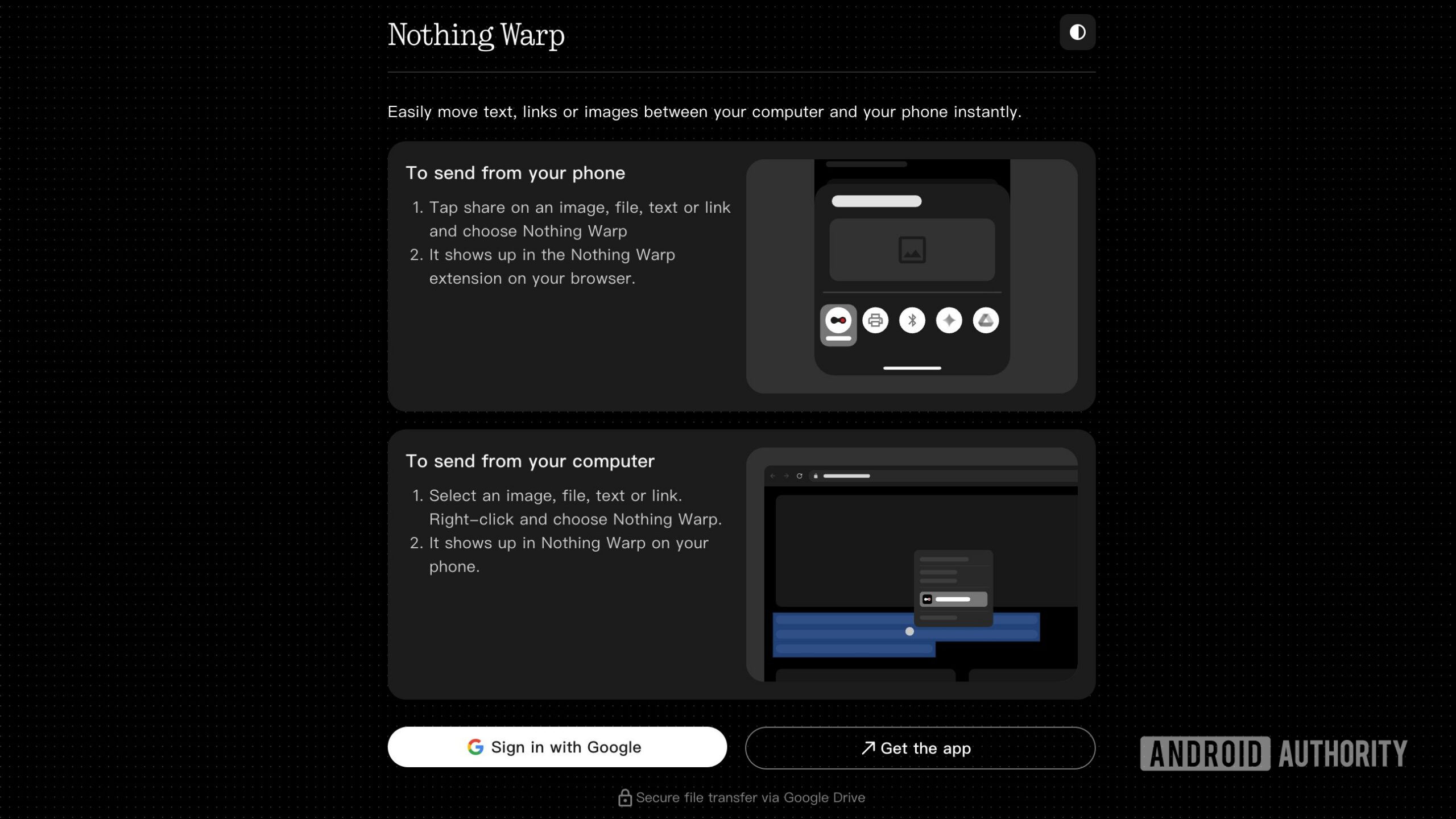
This approach sidesteps the limitations of traditional local network transfers, which require both devices to be on the same Wi-Fi and often involve clunky setups. Instead, Nothing Warp relies on your Google account as the authentication and synchronization backbone. As long as both your phone and desktop are signed into the same Google account, the system works—no matter where you are in the world.
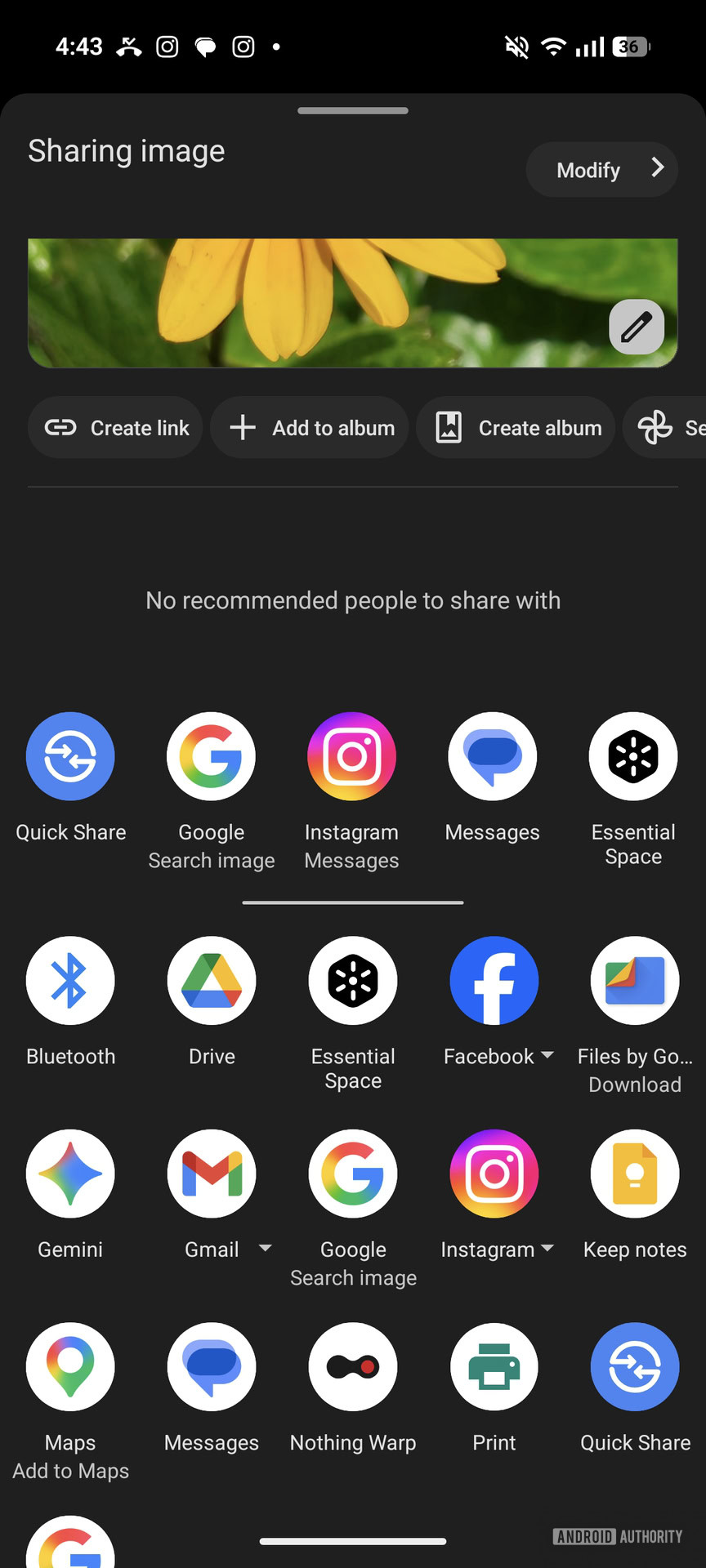
The app supports a wide range of content types: photos, videos, documents, links, and even copied text from your clipboard. For example, you can copy a link on your phone, open the Nothing Warp app, and it will appear instantly in the Chrome extension on your desktop. It’s not quite magic, but it’s close.
Cross-Platform Compatibility: A Rare Win for Android Users
One of the most impressive aspects of Nothing Warp is its universal compatibility. Unlike Apple’s AirDrop, which only works between Apple devices, or Samsung’s Quick Share, which is limited to Samsung hardware, Nothing Warp works on any Android phone or tablet—regardless of brand. Whether you’re using a Pixel, a OnePlus, or even a budget Motorola, the app functions identically.
On the desktop side, the Chrome extension runs on Windows, macOS, and Linux, making it one of the few truly cross-platform solutions available. This broad compatibility is a breath of fresh air in an ecosystem often fragmented by manufacturer-specific tools.

The setup is refreshingly simple: download the Nothing Warp app from the Google Play Store, install the Chrome extension, and sign into both with the same Google account. Once linked, the devices communicate automatically. There’s no need to scan QR codes, pair devices, or configure network settings.
Privacy and Permissions: A Necessary Trade-Off?
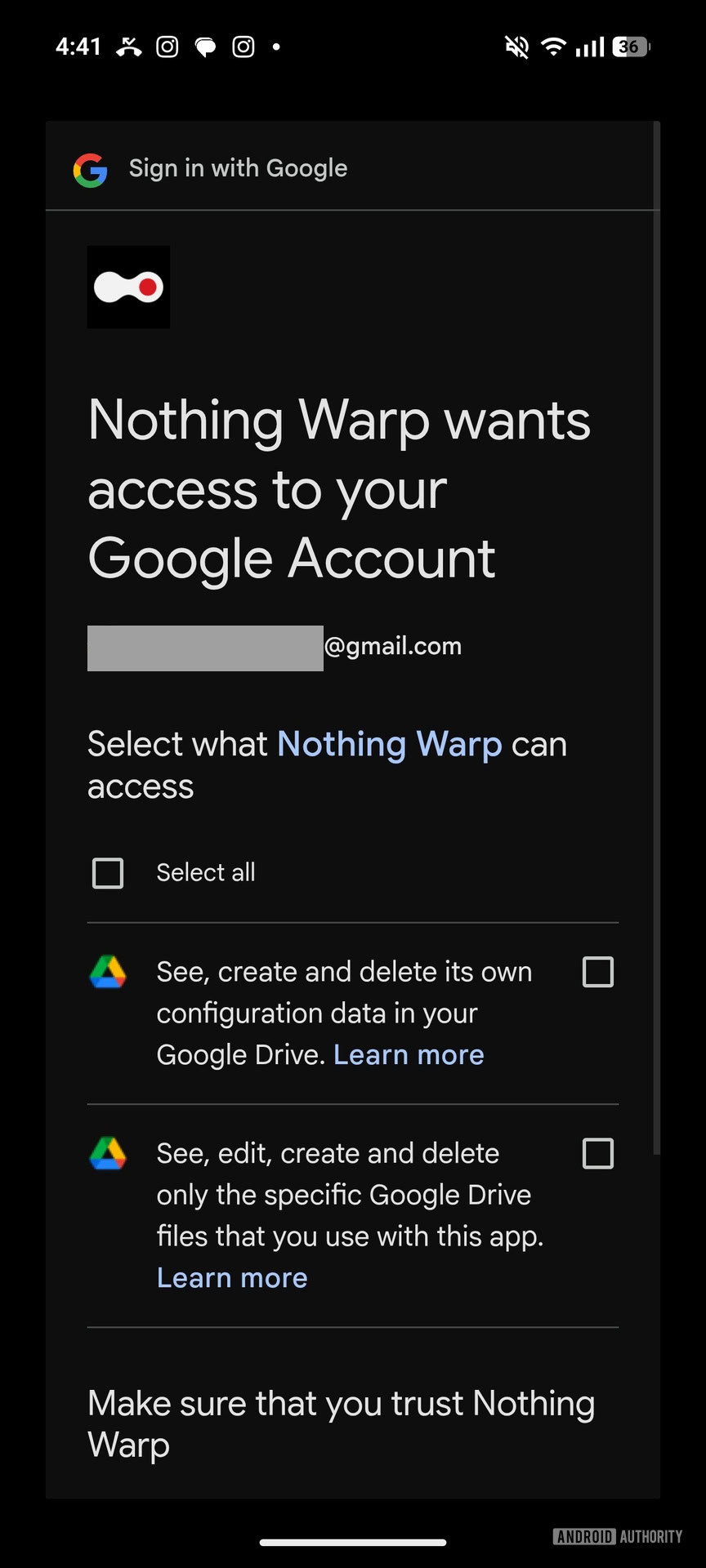
While Nothing Warp is undeniably convenient, it does come with privacy considerations. The app requires extensive permissions on both Android and Chrome, including access to your Google Drive, clipboard, and file system. These permissions are necessary for the app to function—especially the clipboard access, which enables instant text sharing—but they may give some users pause.
Nothing has emphasized that files are only stored temporarily in Google Drive and are automatically deleted once the transfer is complete. The company also states that no data is stored on its servers; everything passes through Google’s infrastructure. Still, the reliance on a shared Google account means that your transfer history is technically visible within your Drive activity log.
For users already deeply embedded in the Google ecosystem, this may not be a dealbreaker. But for privacy-conscious individuals, it’s worth weighing the convenience against the level of access granted.

Real-World Use Cases: Where Nothing Warp Shines
Imagine you’re working on a presentation on your MacBook, and you need to insert a photo from your Android phone. With Nothing Warp, you can snap the photo, open the app, and send it directly to your desktop—no cables, no email, no cloud folder hunting. The image appears in your Downloads folder within seconds.
Or consider a student researching online: they find an article on their phone, copy the URL, and instantly paste it into their laptop browser. Or a designer who sketches ideas on their tablet and wants to transfer them to their desktop for refinement. Nothing Warp eliminates the friction that often slows down creative workflows.
Even casual users benefit. Sending a funny meme from your phone to your desktop to share in a Slack channel? Done in seconds. Transferring a boarding pass screenshot before a flight? Seamless.
Transfers typically complete in under 10 seconds.
The app uses end-to-end encryption during transfer.
Clipboard sync works for text up to 10,000 characters.
The Chrome extension updates automatically via the Web Store.
The Bigger Picture: Nothing’s Strategy Beyond Hardware
Nothing Warp is more than just a useful app—it’s a strategic move by a company trying to build an ecosystem without the hardware dominance of Apple or Samsung. While Nothing’s phones have been well-received, especially the Phone (2) and the recently launched Phone (2a) Pro, the company knows it can’t compete on scale alone.
By releasing tools like Nothing Warp, Nothing is positioning itself as a software innovator that enhances the Android experience for everyone, not just its own users. It’s a clever way to build brand loyalty and demonstrate value beyond hardware.
This approach echoes what companies like OnePlus and Nothing’s founder, Carl Pei, have long advocated: that software and user experience are just as important as specs and design. In a market saturated with similar-looking phones, tools like Nothing Warp help Nothing stand out.
Carl Pei, co-founder of OnePlus and founder of Nothing, previously worked at HTC and was instrumental in developing the OnePlus One’s “Never Settle” software philosophy. Nothing Warp continues that legacy of user-centric innovation.
Limitations and Room for Improvement
Despite its strengths, Nothing Warp isn’t perfect. The reliance on Google Drive means that users with slow internet connections may experience delays. Large video files, while supported, can take longer to transfer, especially on metered connections.
Additionally, the app currently lacks support for iOS. While this is understandable given Nothing’s Android focus, it does limit its appeal to mixed-device households. There’s also no native desktop app—only the Chrome extension—which may deter users who prefer standalone applications.
Another minor gripe: the app doesn’t support batch transfers natively. Sending multiple files requires individual actions, which can be tedious for large projects.
Still, these are relatively minor issues in what is otherwise a polished and functional tool. Given that Nothing Warp was released as a beta-like product, future updates could address many of these limitations.
The Future of Cross-Device Connectivity
Nothing Warp arrives at a time when cross-device workflows are becoming increasingly important. With remote work, hybrid setups, and multi-device lifestyles on the rise, users crave tools that eliminate friction between their gadgets.
While Apple’s Continuity features and Samsung’s ecosystem integrations offer some solutions, they remain locked within their respective walled gardens. Nothing Warp, by contrast, embraces openness and universality—a refreshing stance in today’s tech landscape.
As Nothing continues to grow, tools like Warp could become part of a broader suite of productivity enhancements. Imagine a future where Nothing Phone users can hand off calls to their laptops, or where their earbuds automatically sync with their desktop audio—all powered by the same seamless philosophy.
Studies show that reducing digital friction—like the time spent transferring files—can lower stress and improve focus. Tools like Nothing Warp contribute to a healthier, more efficient digital workspace.
Final Thoughts: A Surprise Worth Celebrating
Nothing Warp may not have been promised, but it’s a welcome surprise that delivers real value. It’s a testament to the power of internal innovation—what starts as a tool for engineers can evolve into something that benefits millions.
For Android users tired of juggling USB cables, email attachments, and cloud folders, Nothing Warp offers a glimpse of what seamless connectivity could look like. It’s not perfect, but it’s a bold step toward a more integrated digital life.
And perhaps most importantly, it proves that even in a market dominated by giants, a small company with a clear vision can still make a big impact—one warp at a time.
This article was curated from Nothing promised AirDrop support, but gave us Nothing Warp instead via Android Authority